Last updated: August 25, 2026
BldrTeam Text Messaging sends account and project notification text messages related to your BldrTeam account and the construction projects in which you participate. Notifications may include contextual project updates, schedules, tasks, documents, approval requests, and activity in BldrTeam Messages. BldrTeam does not send marketing messages through this program.
When a BldrTeam customer asks for your consent, you may opt in through a dedicated BldrTeam web form by affirmatively checking an unchecked consent box and submitting the form. Consent is specific to your mobile number and is not transferred if that number changes.
By opting in, you agree to receive account and project notification text messages from BldrTeam about your account, projects, schedules, tasks, documents, approvals, and messages. Message frequency varies. Message and data rates may apply. Reply STOP to opt out or HELP for help. Consent is not a condition of purchase or use of BldrTeam services.
Follow the web-form opt-in instructions below to enable text notifications from your BldrTeam profile.
The example below shows the client portal. Vendors, build partners, and BldrTeam users follow the same consent screen from their own profile.
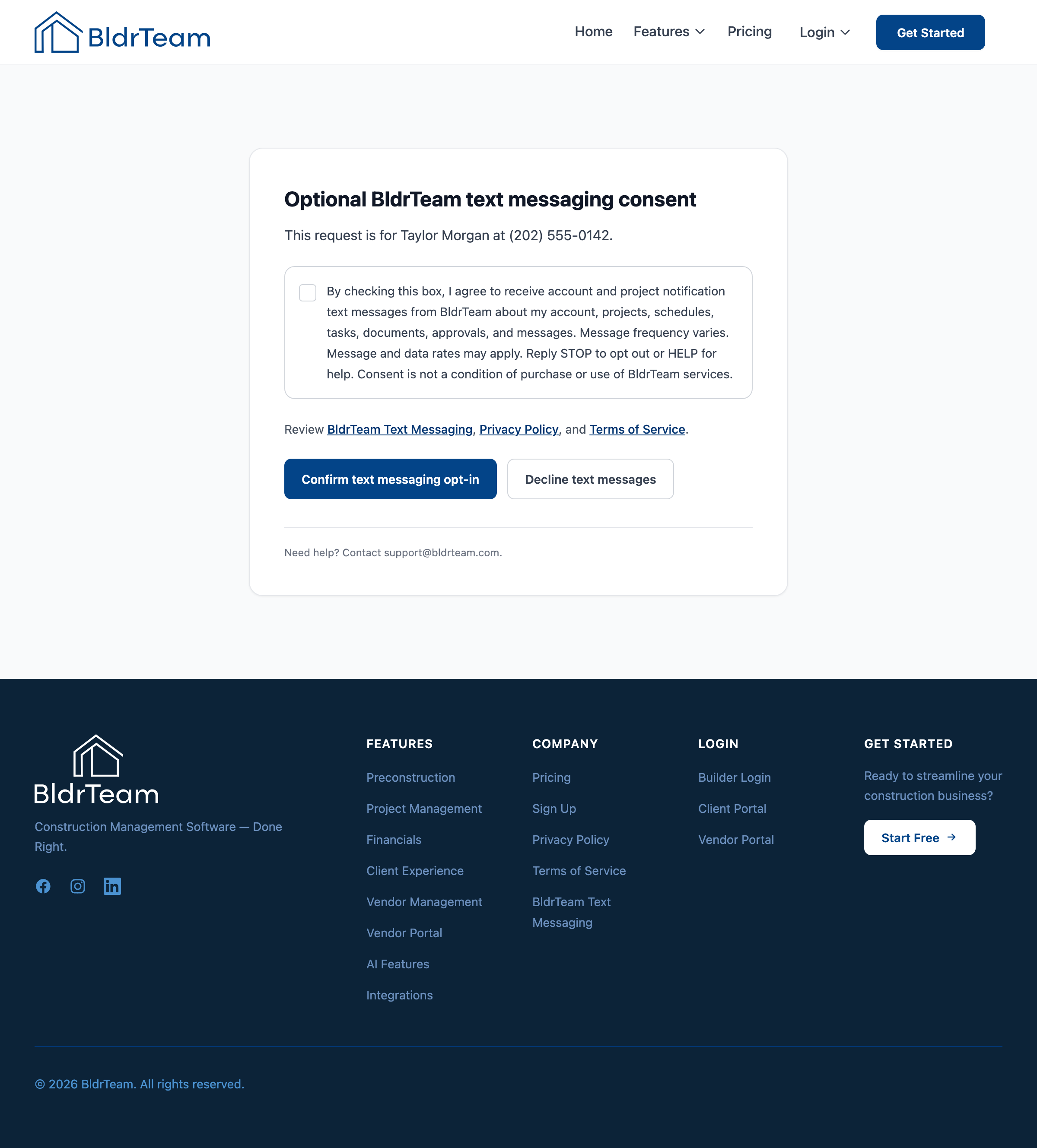
The checkbox starts unchecked and must be selected before the form can be confirmed. Review the Privacy Policy and Terms of Service linked from the consent screen for additional details.
Message frequency varies based on project activity and the notification choices enabled for your contact. Message and data rates may apply according to your mobile carrier and plan. Mobile carriers are not liable for delayed or undelivered messages.
Opting out disables BldrTeam text notifications for that mobile number. You may still use BldrTeam and receive communications through other channels.
We do not sell your personal information. Mobile information and SMS opt-in data are handled as described in our Privacy Policy. Use of the program is also subject to our Terms of Service.
BldrTeam.com
Raleigh, North Carolina
support@bldrteam.com